 ChangeProof
You did the extra work. Get paid for it.
ChangeProof is the change order app for contractors. Photograph the extra work, add a price, and text your customer a link. They review it and sign on their own phone, with no app or account. You get a time-stamped, tamper-evident record of exactly what they approved.
14-day free trial. Everything included. No credit card.
Extra work is where contractors lose money
"While you're here, can you also…" It happens on every job. You do the extra work on a handshake, and when the bill comes the customer remembers a different price, or says they never agreed to it at all.
- Verbal approvals turn into disputes, unpaid invoices and bad reviews.
- Paper change orders are slow, get lost, and rarely get filled out on site.
- Texts and emails don't prove what the customer actually saw and agreed to.
ChangeProof fixes this in under two minutes per change: the customer sees photos of the work and the exact price, and signs before you start.
How ChangeProof works
Start a change order on site
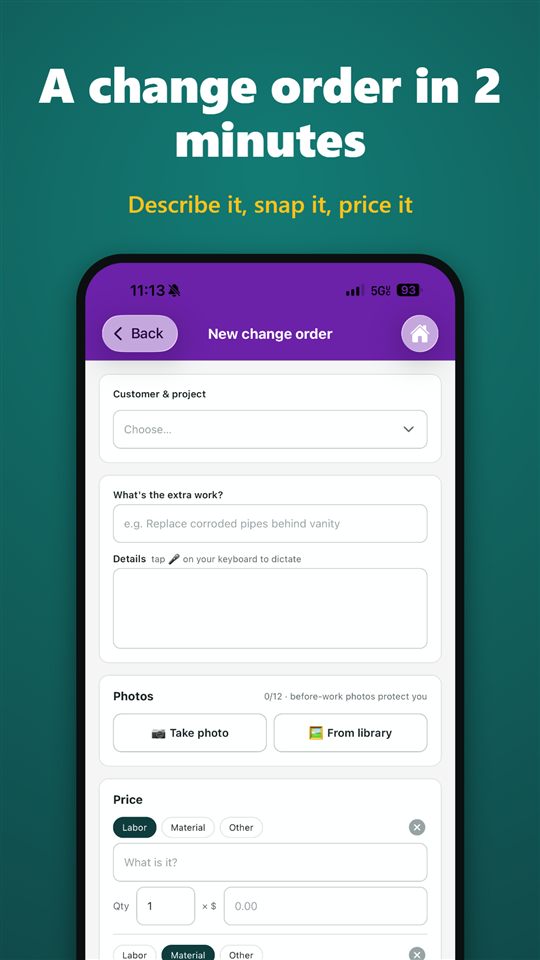
Tap New change order, pick the customer and project (or add a new customer on the spot), and describe the extra work in plain words or with your phone's voice dictation.
Snap photos of the work
Take photos with the camera or pick them from your library, up to 12 per change order. Before-work photos protect you if there's ever a question.
Price it line by line
Add labor, materials and other costs with quantity and unit price. ChangeProof totals it for you.
Send the approval link
Text it, email it, share it or copy the link with one tap. Or hand your phone to the customer and let them sign right there.
Your customer signs on their phone
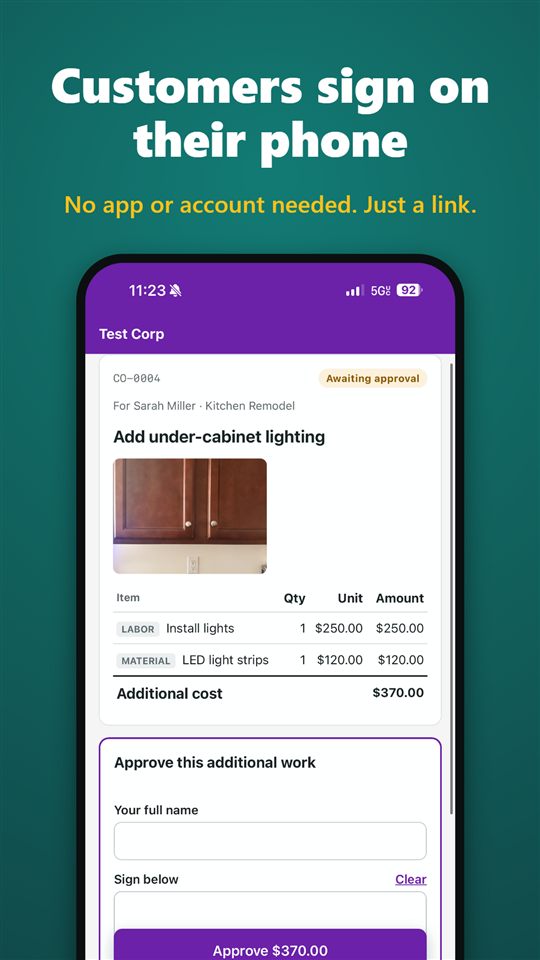
They see the photos, description and itemized price, type their name, sign with a finger and tap Approve. Or they decline and tell you why.
Keep the proof
The approval, signature, time stamps and a downloadable PDF are saved to the change order automatically.
Your customer signs in seconds, without an app
Homeowners don't want another app or password. ChangeProof sends a secure, private link that opens in any phone or computer browser.
- They see your business name, the photos, the description and every price line.
- They type their full name, sign with a finger or mouse, and confirm they agree to sign electronically.
- They can also decline and leave a reason or question for you.
- They can download their own PDF copy of the change order.
A record that holds up
Every approved change order becomes a clear, time-stamped record of what was agreed, when, and by whom.
Tamper-evident
When you send a change order it's locked and fingerprinted, including the photos. If anything changed after sending, it can't be approved.
Full activity timeline
See when the link was sent, first opened, approved or declined, with the signer's IP address and device recorded.
Professional PDF
One tap downloads a PDF with your business details, the photos, itemized prices, total, the customer's signature and the approval history.
Revise, don't overwrite
Need to change something after sending? Withdraw it, or create a revised copy with a new number and a new link. The original stays on record.
Everything a contractor needs for change orders
Home dashboard
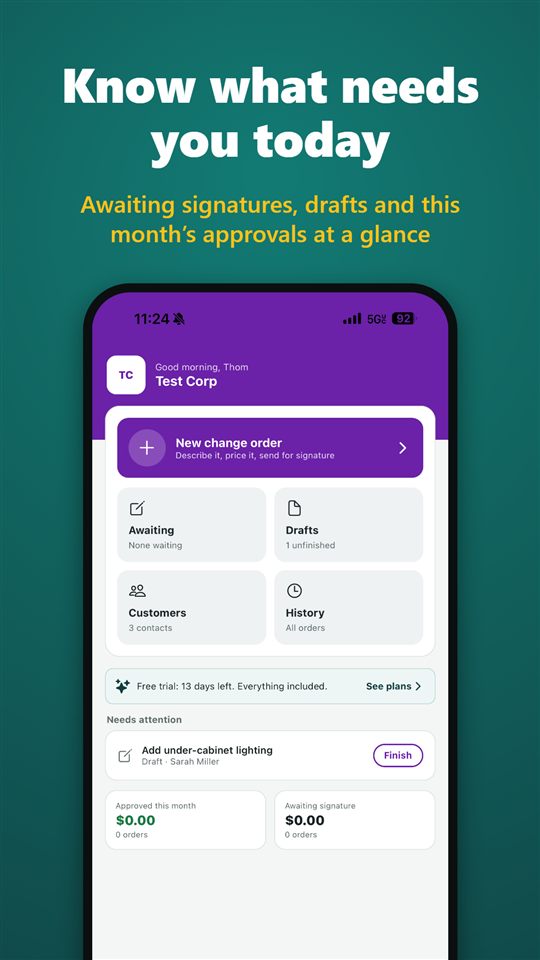
See what needs you today: change orders awaiting signature with their dollar total, unfinished drafts, approved this month and recent activity.
One-tap reminders
Customer hasn't signed yet? Tap Remind to text them a friendly reminder with the link.
Customers and projects
Keep every customer's phone, email and address with their projects and change orders. Call or email them from the app.
Search your history
Find any change order by customer, project, title or number, and filter by awaiting, approved, drafts, declined or withdrawn.
Itemized pricing
Labor, materials and other lines with quantity and unit price, totaled automatically. No math on the job site.
Photos built in
Up to 12 photos per change order, automatically resized so they upload fast on a job-site connection.
Send any way you like
Text, email, the share sheet, copy the link, or let the customer sign on your phone in person.
Drafts
Start a change order, save it as a draft and finish it later. Drafts show up on your home screen until they're sent.
Your branding
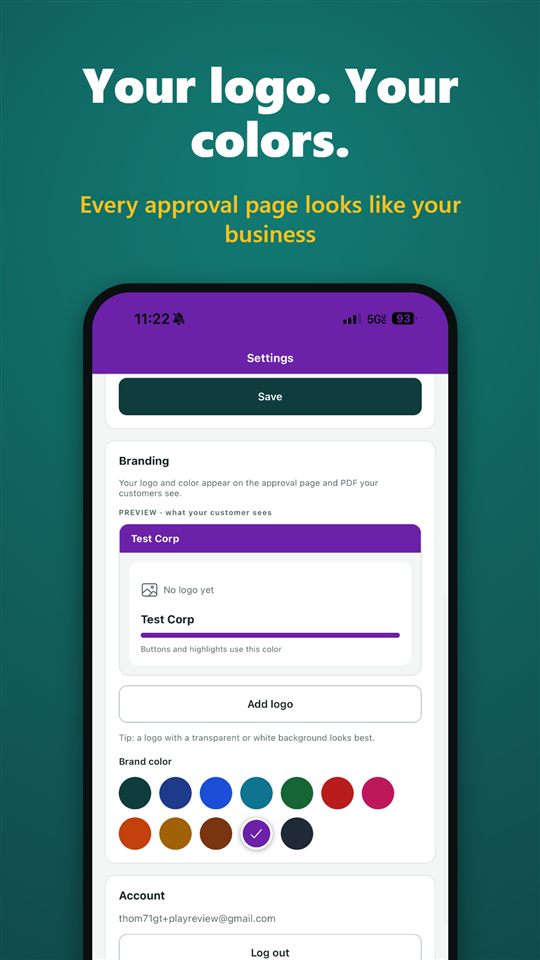
Add your logo and pick your brand color. Your approval pages and PDFs look like your business, not someone else's app.
iPhone and Android
Native apps for both. Your account and records sync securely, so nothing lives only on one phone.
Private and secure
Encrypted in transit and at rest. Each approval link is a long random code that opens only that one change order.
You own your data
Delete your account and all of its data anytime, right in the app.
Look like the pro you are
With the Pro plan, your logo and brand color appear across the approval page your customer sees and on every PDF. Clean, professional paperwork builds trust and gets faster yeses, and your customer remembers who did the work.
Choose from twelve brand colors designed to stay readable, and preview exactly what your customer will see before you send anything.
Built for the trades
ChangeProof is made for independent and small contracting businesses doing residential and light commercial work, anyone who gets asked for "just one more thing".
- General contractors
- Remodelers
- Kitchen and bath
- Plumbers
- Electricians
- HVAC
- Painters
- Roofers
- Flooring and tile
- Carpenters
- Landscapers
- Handymen
- Decks and fences
- Concrete and masonry
Simple pricing
Start with a 14-day free trial with everything included and no credit card. Then pick the plan that fits.
Starter
- Unlimited change orders
- Photos, e-signatures and PDF records
- Customer and project history
- No "Powered by" line
Pro
- Everything in Starter
- Your logo on approval pages and PDFs
- Your brand color throughout
Team
- Everything in Pro
- Multiple users on one account
- Coming soon
Subscriptions are billed monthly through the App Store or Google Play and renew automatically until cancelled in your account's subscription settings. Prices in US dollars; local prices may vary.
Frequently asked questions
Does my customer need to download an app?
No. Your customer opens a secure link on any phone or computer, reviews the photos and price, types their name and signs with a finger or mouse. No app, no account, no password.
What does the approval record include?
The description, photos, itemized prices and total exactly as sent; the signer's typed name and drawn signature; the date and time the link was sent, first opened and signed; and the signer's IP address and device. Everything is saved in a PDF you can download and share.
Can a change order be altered after it's sent?
No. When you send a change order it's locked and fingerprinted. If anything had changed, it couldn't be approved. To change something, withdraw it or create a revised copy, which gets a new link.
Is an electronic signature legally valid?
In the United States, electronic signatures are generally recognized under the federal ESIGN Act and state UETA laws, and your customer explicitly agrees to sign electronically. ChangeProof isn't legal advice, so check any specific requirements for change orders in your state or contract.
What happens if my customer declines?
They can decline and leave a reason or question. You see it right away in the app, and you can revise the change order and send a new link.
Can my customer sign on my phone instead?
Yes. Tap Customer signs on this phone and hand them your phone. It's the same approval page and the same record.
How much does it cost?
Every new account gets a 14-day free trial with everything included. After that, subscribe to Starter ($14.99/month, unlimited) or Pro ($24.99/month, unlimited plus your logo and brand color). Cancel anytime.
Does ChangeProof work outside the US?
Today ChangeProof works in English with prices in US dollars. Support for other currencies and Spanish is coming soon.
Is my data private?
Yes. Your records are visible only to you. A customer can see one change order only through the link you send them. Data is encrypted in transit and at rest, and you can delete your account and all of its data anytime. Read the privacy policy.
Does it need an internet connection?
Yes. Sending, syncing and approvals need a mobile or Wi-Fi connection, and photos are compressed so they upload quickly on job-site signal.
Get every extra approved before you do it
Download ChangeProof and send your first change order in two minutes. 14 days free.